
Explore the latest product and data releases, and see what's next.

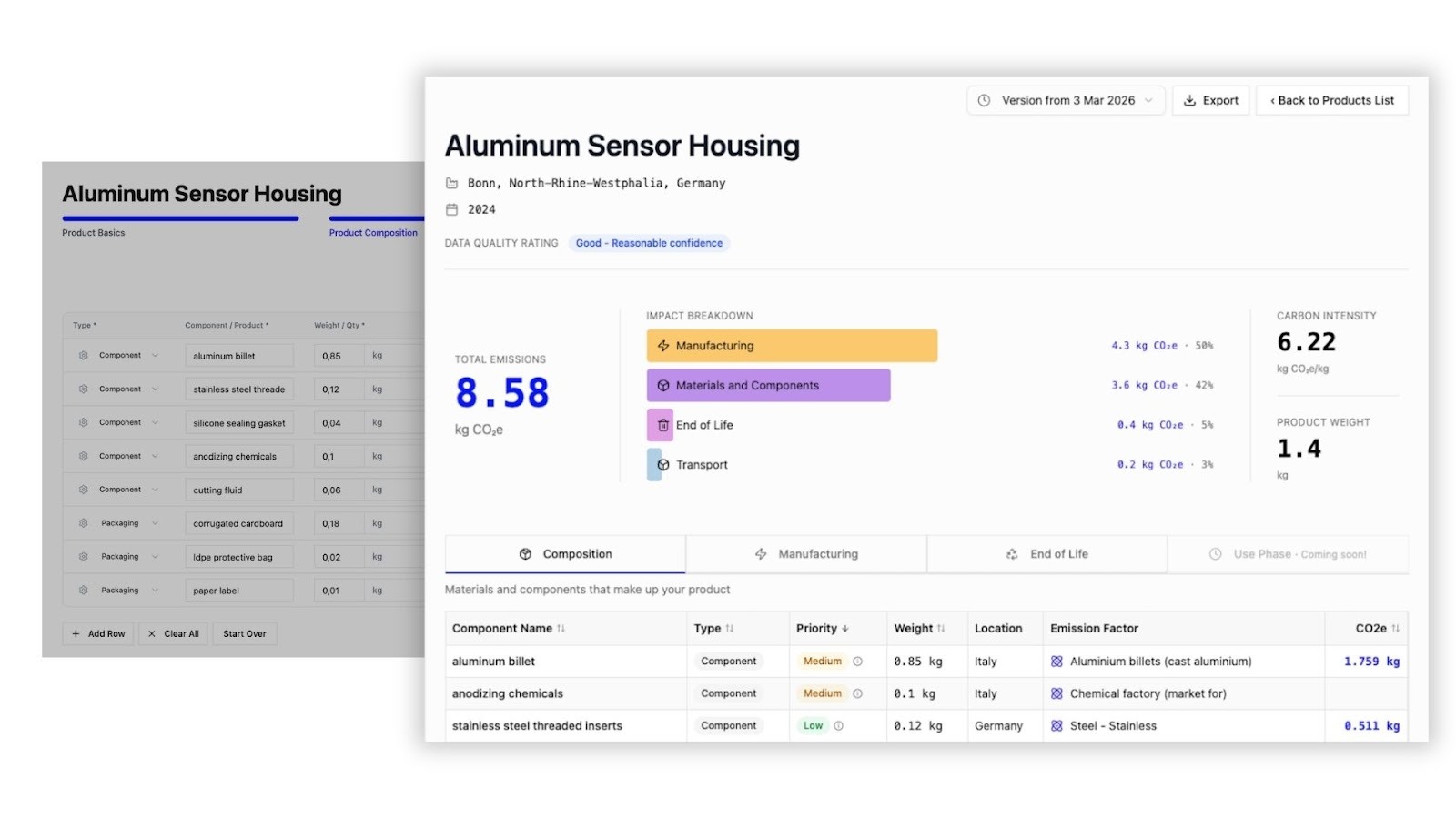
PCF Studio now supports use-phase and end-of-life calculations to provide you with a cradle-to-grave emissions breakdown for your product. This means you can manage the complete impact of your products, tracking emissions from raw material sourcing through manufacturing, logistics, customer use, and final disposal.
You can add data or use AI to get suggestions for your downstream emissions natively within PCF Studio. When adding use-phase activities, you can account for the lifetime emissions of your product’s electricity and fuel consumption, consumables, or water usage, which are calculated using emission factors from our database. In a coffee machine, for example, this would cover cleaning supplies as well as electricity for heating and pumping water.
This is particularly useful for products that have high carbon emissions in their usage and disposal, such as electronics. The cradle-to-grave PCF for a toaster, for example, might see use-phase emissions make up over 80% of the total footprint. Cradle-to-grave visibility gives you a much stronger understanding to optimize lifetime emissions, verify sustainability claims, and plan for end-of-life processes.
To give it a go, try PCF Studio out for free here →
.jpg)
Because nobody’s perfect (although Climatiq users get pretty close), you can now easily delete a PCF in Studio to streamline your workspace.
Additionally, we have increased the size limit for API calls from 10MB to 20MB, so you can calculate even more complex PCFs.
You now receive more precise error messages in Studio when a location does not have an emission factor match, with clear steps to help you edit the region or access more comprehensive data that will cover your needs.
Data Studio brings you multiple access modes to use Mapping Agent so you can automatically map text input to emission factors without having to write a single line of code. And the emission factors matches from Mapping Agent just got even better: the CSV uploader and Data Explorer AI mode now use our latest model. This means the model can extend its reasoning beyond the inputted text to find matches for ambiguous inputs and provide you with even more accurate matches.
That’s not the only recent update to Data Studio. We’ve raised the emission factor export limit to 5,000 rows, making it easier for you to access the data you need, where you need it.
Do you have suggestions for features you’d like to see in Data Studio? Reach out to our sales team here →
Understandably, when decarbonizing your logistics operations, you want to be able to reflect the impact on emissions in your reports. If you’re implementing new eco-friendly electric vehicles, using standard emission factors won't capture those decarbonization efforts.
That’s why the freight endpoint now supports user-supplied energy intensity on electric road legs. The new energy_intensity parameter lets you supply your own measurement of how much energy the vehicle uses so you can accurately reflect emissions reductions in the freight calculations you make via Climatiq.
Learn more about the Freight endpoint here →
We’ve released version 1.4 of the Energy endpoint, with support for 26 new regions. Notably, the Energy endpoint now brings you the latest data from ADEME and brand new coverage for China, Taiwan, Japan, and Malaysia by using data release 37. There’s also expanded coverage for heat factors in the Nordics and Italy.
In methodology, US states now map to their dominant eGRID, and we’ve added fallbacks to fuel_use to allow for better matches.
This is a non-breaking change, so you can just update the URL and immediately start using it. Find the changelog here →
/travel, /procurement, and /estimate endpoints, saving you from making messy manual conversionsGWh as an energy parameter, expanding the available units for large inputs. More here →
Data release 37, including new additions:
For a full overview of data updates, please visit our data release notes.
One of the biggest blockers to PCF creation is a lack of data. Our new /screen endpoint lets you create screening-level PCFs from whatever product data you have, including just a product name and a location. The endpoint uses AI to generate assumptions about the product, which you can use to fill data gaps in your calculations, such as product components, sourcing locations, manufacturing processes, or energy usage.
The /screen endpoint makes it easier than ever to add PCF capabilities to your platform and for users to get an initial estimate of their products' carbon impact without the endless wait for supplier or internal data.
Every PCF created with the /screen endpoint can be accessed and edited using the PCF /estimate endpoint, which allows users to replace assumptions with real data as it becomes available.
We’re looking for early users who can provide feedback and help shape development. If you’re interested in trying it out, reach out to our sales team here →
Selecting the right emission factor can be complicated, and the selection often contains assumptions and choices that can materially change overall results. Therefore, those assumptions and choices need to be transparent and easily accessible in order for you to understand, trust, justify, and act on your calculations.
This is why Mapping Agent now gives you a detailed breakdown to explain your emission factor match across:
Mapping explanations are already live in the Mapping Agent and PCF APIs, and will be coming to PCF Studio soon. To activate this feature in the API, set the explain_results boolean flag to true. Read more here →
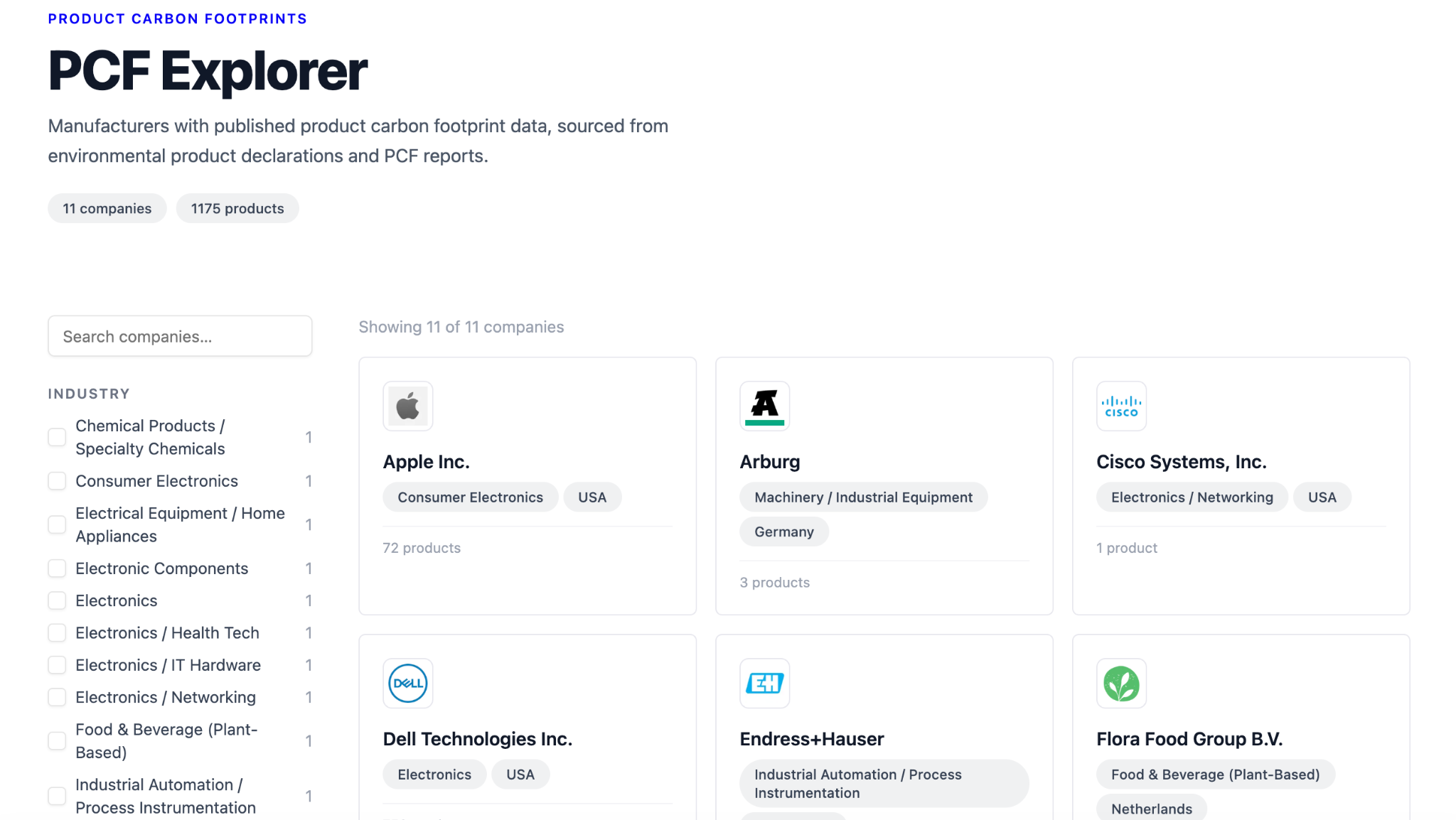
We’re not just making it easier to calculate PCFs, we're also making it easier to find existing PCFs that are already out there for products you may be buying.
Our new PCF Explorer collects PCFs from companies including Apple and NVIDIA so you can access published product-level insights in one unified platform. While published PCF data is still rare, it’s steps like this that push for increased transparency and awareness.
PCF Explorer is still very new and we’d love for you to give it a spin—and give your feedback. You can try it out here →
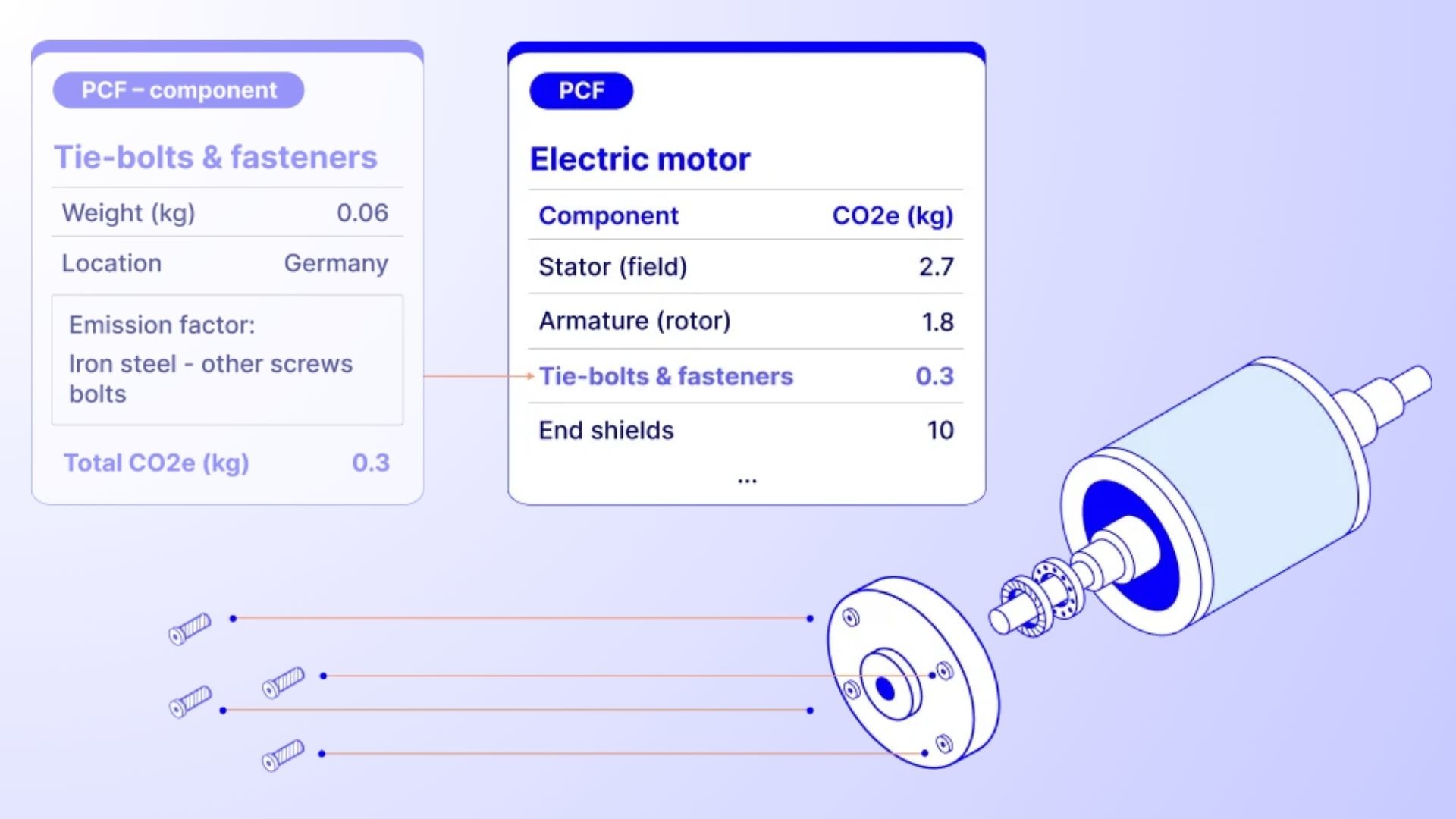
You can now reference previously created PCFs as the inputs of other PCFs in PCF Studio. This allows you to handle complex product structures that appear in multi-level bills of material much more smoothly, and to build out a family tree of your components and subassemblies. When a component appears across multiple products, you can now calculate it once and reuse it everywhere. As a result, you can improve both your speed and reporting consistency across your product range.
We’ve also added a sample PCF to PCF Studio so you can see what a finished output looks like and all features of PCF Studio in action before you get started modeling your own products.
Follow the links to try PCF Studio here →
Data release 36, including new additions:
For a full overview of data updates, please visit our data release notes.
Turn your AI tool into a custom product carbon footprint engine. The Climatiq PCF MCP lets you easily bring vetted emission factor datasets and ISO 14067-verified methodology into Claude, ChatGPT, and custom AI agents, so you can run PCF calculations directly from the AI tools you already use.
In minutes, you can connect Climatiq to your AI and build your own PCF workflows: turn messy product sheets into PCFs, screen products in seconds, test material or sourcing changes on the fly, and much more.
Want early access? We’re currently onboarding a small group of testers; contact our team if you want to try it out.
Our latest updates make it much easier to refine, validate, and share your PCFs, so you can supply more reliable results to your customers. The main highlights include:
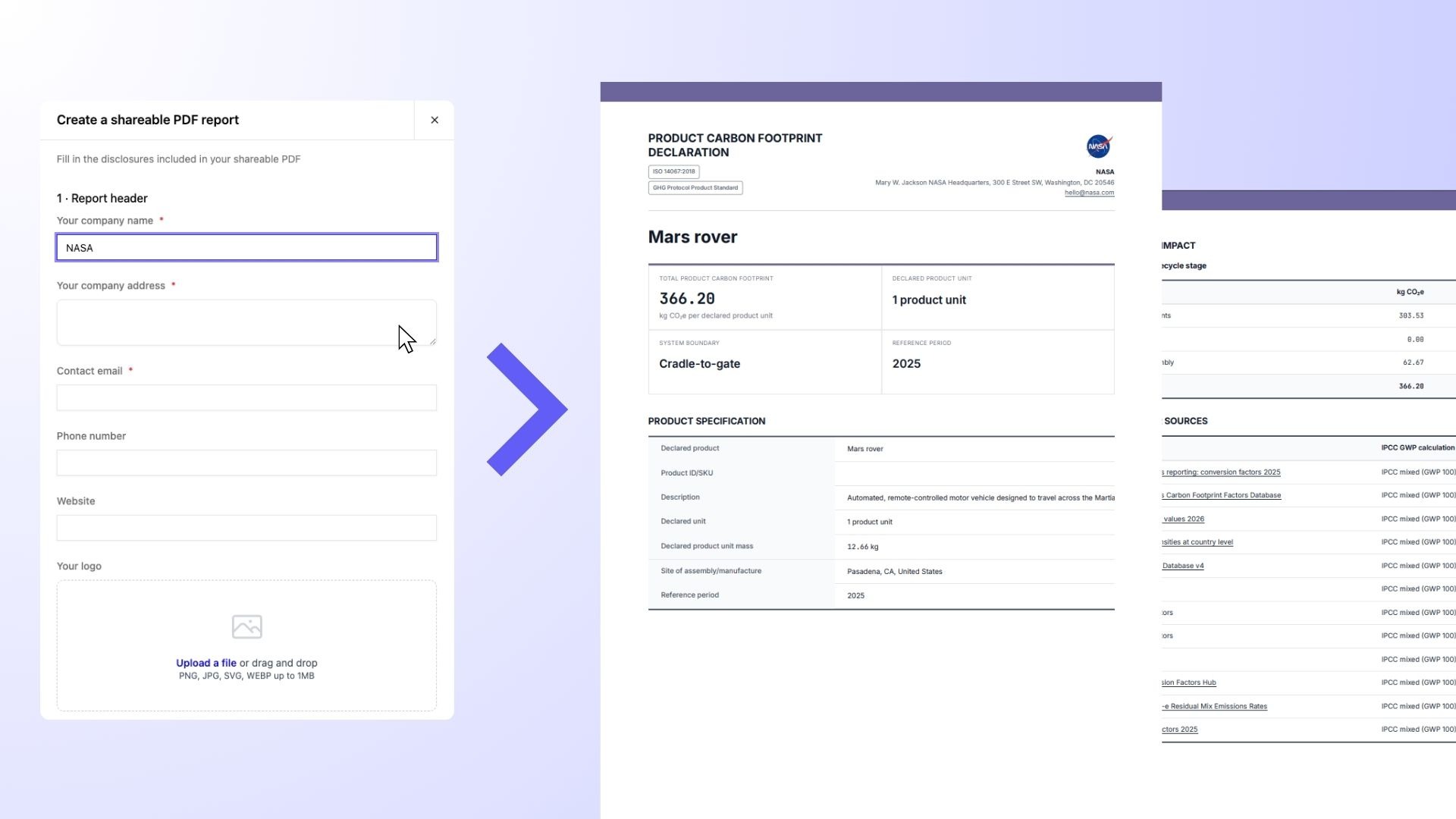
Create and share PDF reports with customers in a few clicks
You can now create branded PDF reports for your PCFs, complete with your company logo, contact details, and brand color so you get a polished final result. Each report covers details a buyer may request in an RFP, such as methodology conformance, data sources used, and breakdown of emissions, without exposing sensitive data like your BoM. For internal reporting, the results also support informed decarbonization target setting and smarter procurement decisions.
Add and use custom factors directly within PCF Studio
You can now add, store, and use custom emission factors when calculating PCFs. This means you can significantly improve the quality of your PCFs by replacing secondary emission factors with your own, primary data. Just select a PCF component, click “Change factor” and then “Use custom factor” to add your own data.
With this change, the Private Emission Factors feature has been opened up to all Climatiq users so that everyone can easily upload and use custom factors when calculating emissions.
Biogenic emissions in PCF components
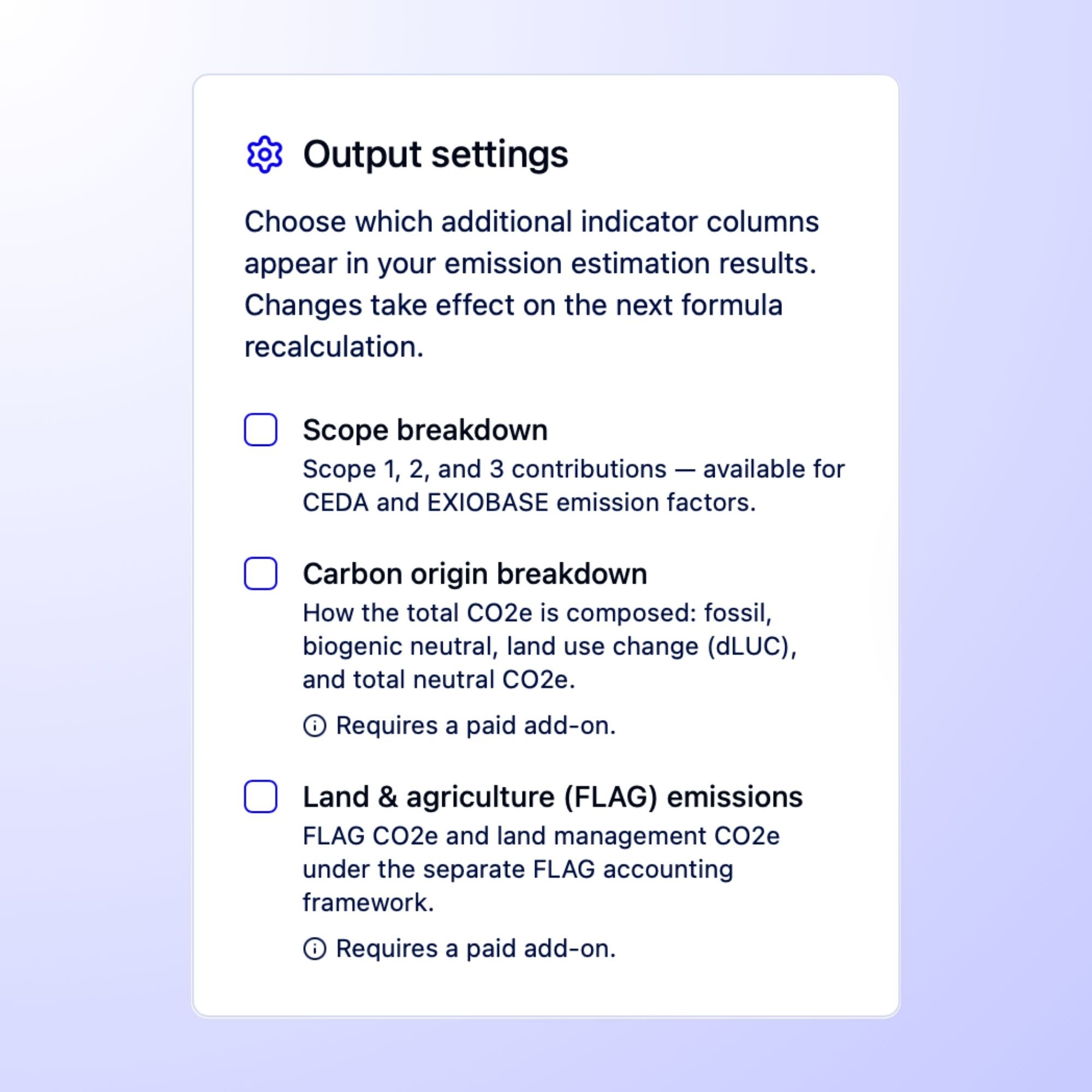
PCF Studio will now show a separate breakdown that represents emissions from fossil, land use change (LUC), and biogenic sources where available—if the emission factor sources do not report biogenic emissions, then the value will be 0. This aligns PCF results with ISO 14067 and the GHG Protocol Product Lifecycle Standard, which require FLAG, LUC, and biogenic breakdowns where data is available.
Edit and remove PCF components and manufacturing processes
We’ve now added the option to add and edit PCF components and manufacturing resources post-creation. This gives you more control to tweak your results and make changes as more data becomes available or you’d like to test the impact of different scenarios such as supplier changes.
Log in to your Climatiq account to try PCF Studio here →
Our AI-powered emission factor matching engine, Mapping Agent, is now out of its beta phase and is production-ready. The update delivers 3x more accurate emission factor results when mapping factors to highly complex terminology so you can get a great match for your search term with the first try. Mapping Agent is also the powerhouse behind automatic emission factor matching in PCF Studio, meaning you now get 3x more accurate matches when uploading BoMs with complex content that is hard to decipher.

For API users, other updates in the general access version include:
/suggest now returns emission factor id and activity_id so you can easily trace back to the exact factor /suggest responses so you get all the details in your API response (note this excludes ecoinvent factors)/estimate now handles inflation adjustments automatically for spend-based calculations, meaning you don’t have to do any messy manual conversions for your scope 3.1 calculationseffort toggle control lets you choose between depth or speed in match results; turn it up for depth and down for speedWith the addition of factor values and IDs to /suggest results , we’ve also removed /suggest/estimate in the new version. You can instead use /suggest to get raw factors and general /estimate to make calculations with the returned factors.
Important information for API users: we're moving to a new set of URLs. The old ones will keep working alongside the new during the migration window (which runs until January 31st 2027), so nothing will break overnight. Find the changelog and migration guide here →
The Excel add-in has added new features that allow you to save time when processing large amounts of data and get more flexibility in your outputs. The updates include:
Read more on using Climatiq in Excel →
Data release 35 takes us to over 1.7 million emission factors, including new additions:
For a full overview of data updates, please visit our data release notes.
Product carbon footprint calculations are one of the fastest-growing areas of carbon accounting, so with so many new tools hitting the market, it’s not easy for sustainability teams to figure out what they can really rely on. That’s why independent standard-setting is so important, and why we’re happy to announce that Climatiq’s PCF API has successfully completed a third-party audit against ISO 14067 and the GHG Protocol Product Life Cycle Standard.
The audit covers the calculation methodology used by our PCF tools, ensuring industry standard frameworks are applied so that outputs are transparent and can be verified and replicated by third parties. To get ISO 14067 verified, auditors review and ensure conformance across key areas:
Whether you use the API or PCF Studio, you can rest assured your PCF calculation methodology is credible and rigorous and will stand up to customer scrutiny.
For many of you who have been working in PCF Studio and using the 10,000 PCFs we’re giving away for free, you’ll have seen lots of changes this month. (If you haven’t had the chance yet, don’t worry, you should still have time!) The major highlights include:
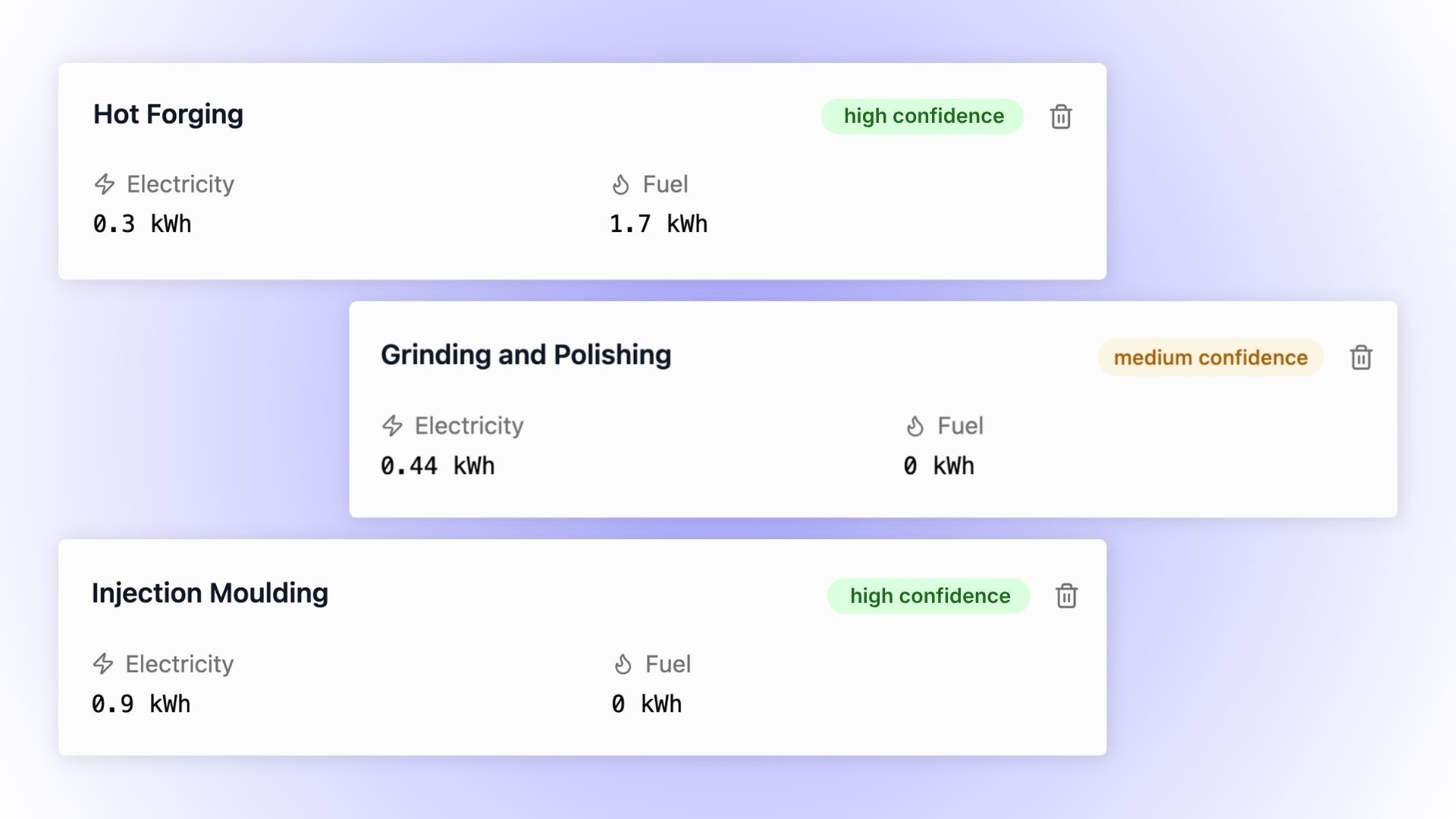
While PCF Studio previously provided the option to supply total energy use for a product, in reality manufacturing happens across many individual processes.
For this reason, we’ve updated PCF Studio's manufacturing inputs so you now have the option to add individual processes that more accurately reflect your actual manufacturing operations. With this change, you now also have the option to add water consumed during manufacturing, so you can capture the full range of emissions from your product’s creation.
And if you don’t have data readily at hand, PCF Studio now gives suggestions for individual manufacturing processes likely involved based on your product's materials.
When you ask PCF Studio to make suggestions, whether you’re creating a BoM template, estimating manufacturing processes, or even when you upload your own BoM to extract product data, they now happen 6x faster. That means less waiting, and more calculating.
After months of user testing and feedback to make the tool as useful for you as possible, PCF Studio is now in public beta. PCF Studio allows any manufacturer to generate a credible PCF they can confidently share in only a few minutes without big consultancy bills, specific training, or complete data.
To let you try it out, we’re giving away the first 10,000 calculations in PCF Studio for free. You just need to sign up or you can use your existing Climatiq account to get started. Get started here →
Our guides are a rich resource of information for anyone getting started with Climatiq. With so much to cover, the previous structure proved difficult to navigate as we added more information and new features. To overcome this, we have gone live with a restructure of our existing guides, as well as refreshing and publishing new and improved documentation that makes it much clearer how to use Climatiq and our features. Some examples of new guides:
We will incrementally be releasing more documentation over the coming weeks. Expect new guides around our methodologies, data sources, Mapping Agent, detailed product overviews, and more. Go to the guides →
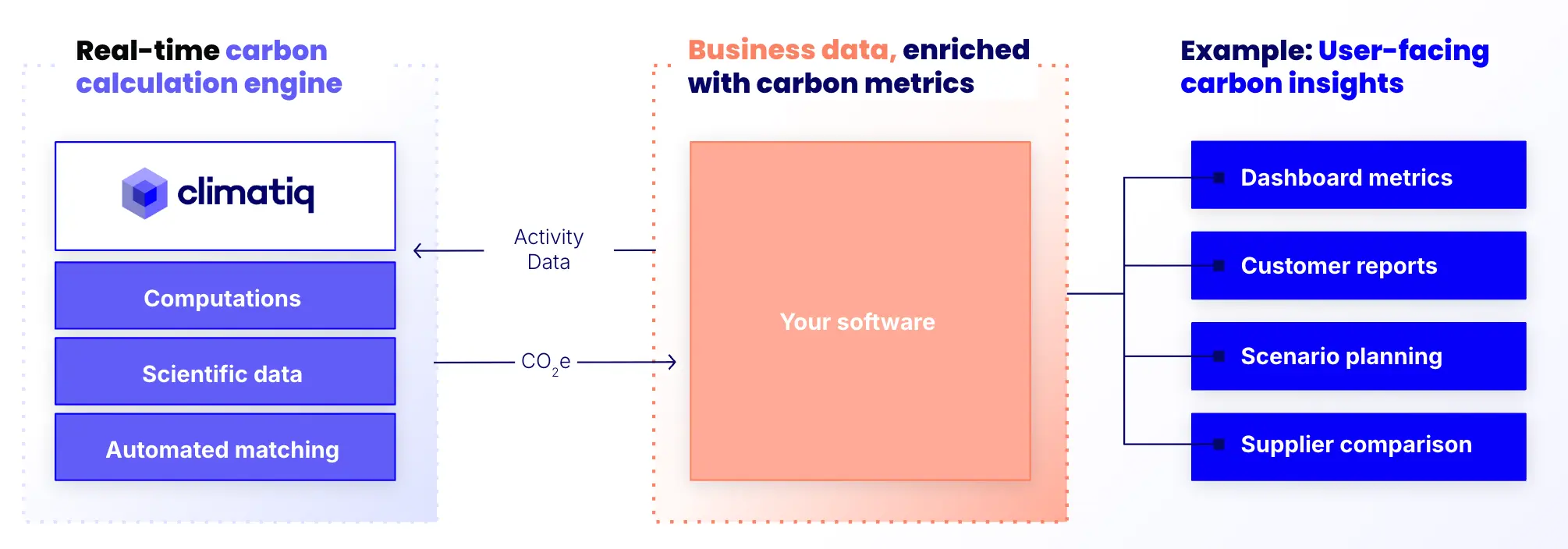
Users often need the option to access custom emission factors, for example to use a proprietary dataset or supplier-specific emission factors in their calculations. For this they can use the private emission factors feature, which has recently seen the following improvements:
scopes to mark your emission factors as valid for only certain scopes. The default is valid for all scopesname and source valuesRead more on private emission factors in the docs →
We’ve renamed Autopilot to Mapping Agent. The new name more accurately describes what Mapping Agent can do: find fitting emission factor matches for text input without you having to manually search through datasets and verify factors. Mapping Agent will keep all the same great functionality you already know, just with a different name.
For even more clarity in Mapping Agent: the Suggest endpoint now returns an id and activity_id for each emission factor, making results more traceable so you can easily refer back to the selected emission factor and find all supporting metadata. Read the documentation here →
Data release 34, including new additions:
For a full overview of data updates, please visit our data release notes.
Our new Data Studio gives you one place to access 1,000,000 verified emission factors, with features to make sourcing and managing data both faster and more reliable. It builds on everything you already know from Data Explorer, with a lot more to come.
What’s available now:
What’s coming soon:
With the release of Data Studio, the Community plan is now the Starter plan. It's still free, and allows you to search emission factors and view partial metadata.
We’ve also added a new Data Pro plan to support professional licensing and auditability needs, with full methodology details for every factor, advanced filters, export tools, and commercial licensing available for consultants. You can upgrade to Data Pro here →
The new version of our PCF API now delivers calculated results up to 8x faster than before, significantly accelerating product carbon footprint calculations for both API and Studio users.
We’ve also introduced a new AI model, making the emission factor mapping process for materials and components significantly more accurate. Mapping Agent reduces the manual effort needed for PCF calculations to help you work faster than ever by reducing the need for manual corrections, especially with larger bills of materials.
Premium data from Carbon Minds is now accessible via PCF Studio and API, offering granular chemicals and plastics emission factors for those with access.
To help you get started with the PCF API, we’ve published three guides walking you through creating PCFs step-by-step, covering:
For more information, you can read the PCF API documentation here →
PCF Studio has new updates to help users accelerate their workflows:
If you’d like to start testing PCF Studio, contact our sales team to get access →
We’ve improved multi-lingual support, so more of the world can map emission factors without modifying their input data and we can better support our global customers. Autopilot now supports 47 languages, up from the previous 17. Additionally, multi-lingual workflows now work about 75% faster than before.
There are also new filter options on the API that let you narrow down your results to receive increasingly relevant emission factor matches. This can be done by sector, to specify an industry, while category applies even smaller subcategories. These allow you to deliver narrower requests to Autopilot, to further improve the accuracy of your results.
Read more about Autopilot here →
The Energy API endpoint has been updated with the latest emission factor data. This brings new regional heat coverage, significant electricity expansion, and new fuel types with methodology improvements. Coverage highlights include:
This is a non-breaking change from v1.2, so you can simply update the URL to start using it.
See the Energy changelog for full updates →
Data release 33, including new additions:
And updates:
For a full overview of data updates, please visit our data release notes.
The problem we set out to solve was straightforward to describe but difficult to execute: emission factor data is published in inconsistent formats and scattered across fragmented sources, making it difficult to trust numbers and defend reports. Carbon accounting professionals were spending enormous energy finding and validating data, and it was impossible for software developers to implement emissions data at scale.
We set out to make emission factors accessible in a single, harmonized, trusted source at a global scale so that you can stop fighting data and start doing impact work.
Today, we’ve crossed 1,000,000 emission factors in our database.
This means you can pick and choose from a wide array of emission factor providers to compile a bespoke dataset with exactly the factors you need. Everything is vetted and standardized in one format so you never have to worry about compatibility or licensing, whether you’re using PCF Studio, Data Explorer, API, or Excel.
We built this database because we think easy access to granular data matters. That’s why we provide you with the most comprehensive resource for vetted emission factor data and endeavour to keep growing the database.
To get full access to our data, you can view our plans here →
Last week, we announced PCF Studio, our new tool for manufacturers to quickly and reliably calculate product carbon footprints.
PCF Studio provides a clear cradle-to-gate PCF result, with emissions broken down across materials, manufacturing, and freight. In turn, you can deliver the carbon visibility your customers need across your product range.
Features of PCF Studio:
This feature is currently in beta. Contact our sales team to get access →
Sometimes, you might need to change some of the processes in your PCF calculation, for example if you change supplier, start using a different energy source, or new data becomes available. To handle this, version control has been introduced in the PCF API so you can update your PCF. You can now add an optional product_id parameter in the request, which signifies an updated estimation of the given product. Each estimate response has a version_id field, which serves as the identifier for this specific estimation.
The new list products endpoint gives you the option to retrieve a list of PCFs previously calculated with Climatiq. The endpoint returns the latest version of each product estimated, which is stored in Climatiq, and ordered by date and time.
You now also have the option to manually specify the data quality indicators (DQIs) for your PCF. As Climatiq cannot know how well a given emission factor matches your processes, it is recommended that you override the data quality rating when you know it’s a good match. You can then adjust the score based on technological representativeness, geographic match, and time accuracy of the emission factor (e.g. whether the correct year is used). This gives you more flexibility and control to get a more representative data quality rating.
Additionally, the location parameter for heat & steam manufacturing processes is now optional and defaults to the manufacturing location.
This feature is still in private beta. Reach out to our sales team to get access →
Previously, you had to manually add transport modes for each leg of your freight journey, which is a difficult task when granular activity data is missing. The underlying logic in Freight v3 has now been improved so that only specifying start and end location is enough for automatic routing to provide a plausible route. In this case, Climatiq can use heuristics to determine a likely transportation mode.
To perform automatic routing and transport mode selection, Climatiq will intelligently pick between sea transportation, which is the most common type of shipping, and road transportation for shorter routes. If Climatiq determines that sea shipping is the most likely transportation mode, but your locations are not close to sea ports, road legs will automatically be added to transport the cargo to the closest port. Read more here →
Freight v3 also supports the new transport mode inland_waterways. Current supported options include Duisburg, Antwerp, Rotterdam, and Genk. This adds new options for you to more accurately reflect your freight journeys.
Data release 31, including new additions:
And updates:
AND data release 32, including new additions:
And updates:
For a full overview of data updates, please visit our data release notes.
/suggest now returns a notice for each suggestion, e.g. to tell you whether region fallback was used to find that suggestion
Our product carbon footprint (PCF) API lets you integrate product-level emission insights into your platform to estimate PCFs at scale.
New updates to the PCF API include:
metadata field is added at the top-level and on each manufacturing component to allow for recording of data like internal IDs, qualitative statements, etc.location is now optional for input componentsThis feature is currently in private preview. Contact our sales team to try it out →
We have significantly improved the user experience in Climatiq for Google Sheets, with revamped UI and simplified formula workflows — following on from last year’s updates in Climatiq for Excel.
Some of the features of the add-on:
For existing users of Climatiq for Google Sheets, you don’t need to do anything — the add-on will automatically update to the newest version.
For new users, you can download it here →
If you’ve logged into your Climatiq account this week, you probably noticed we’ve made some big changes to how the dashboard looks.
We’ve restructured the navigation and improved the look and feel of our interface to streamline your access to Climatiq’s data, unifying the features you need in one easy-to-navigate workspace that allows you to source emission factors and deliver calculations.
It’s where you can:
(If you look closely, you’ll see a lot of tools now live in Data Studio. Keep an eye out for some exciting features coming there soon.)
Data release 30, including new additions:
And updates:
For a full overview of data updates, please visit our data release notes.
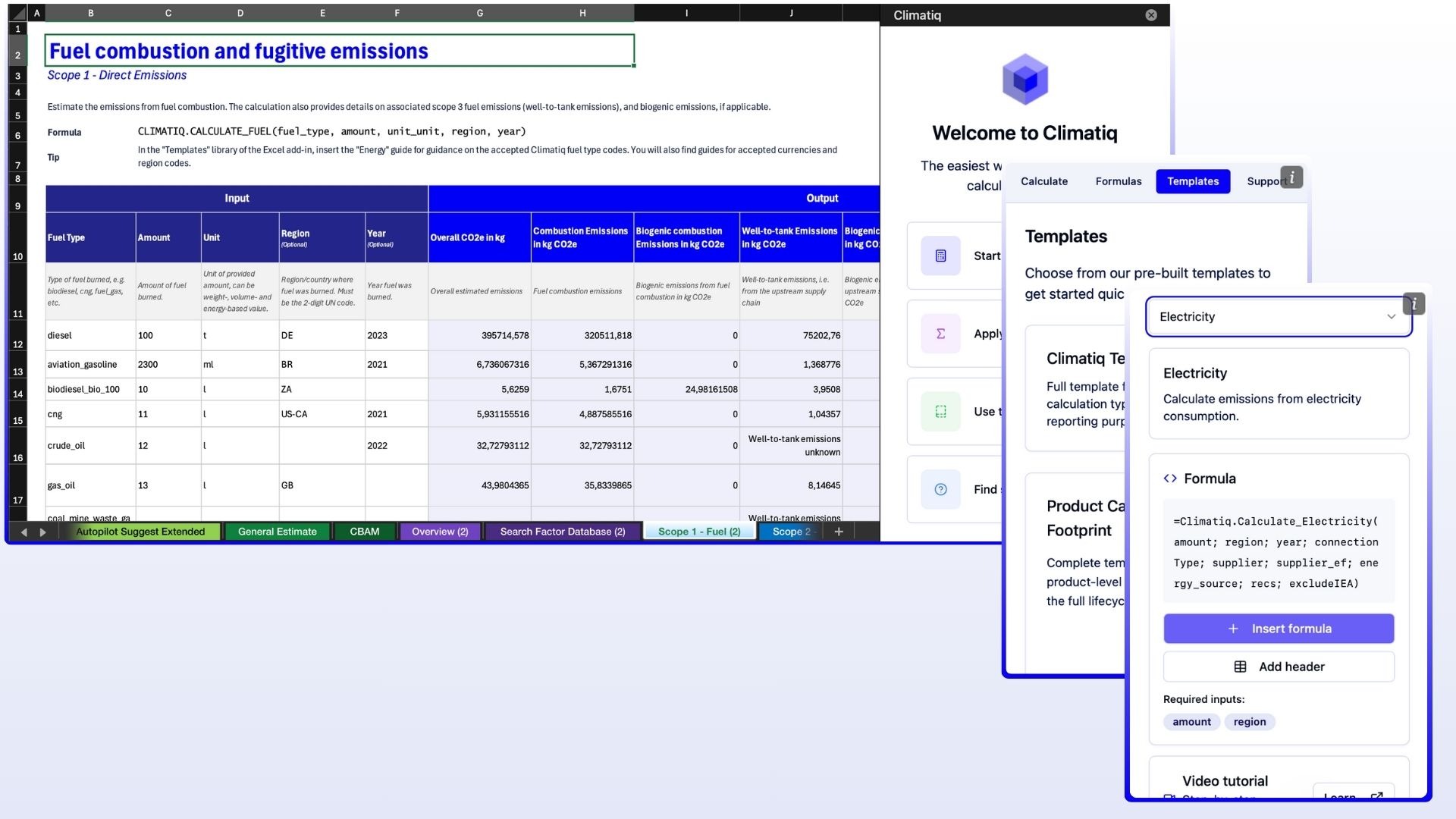
We recently released version 2 of our Excel add-in, with a significantly improved user experience through an easier installation flow, revamped UI, and simplified calculation workflows. If you're a carbon accounting professional working with emissions data in spreadsheets, V2 makes it easier than ever to use Climatiq calculations and data directly within Excel.
Some of the features of the add-in:
This lets you transform business activity data into compliant CO2e estimates without leaving your existing spreadsheets or learning a new tool.
For existing users on v1 of the Excel add-in, you need to migrate to the new version before 1st March 2026 to ensure there are no interruptions to your workflows.
Download the new add-in from Microsoft Appsource here →
Watch our how-to series on YouTube to learn how to use the add-in →
Our newest feature preview allows you to get emission factor matches and calculate emissions by simply uploading a .csv of your business activity data. You can even customize results by filtering for premium data sources, dataset, and LCA activity for more precise and targeted results, or calculate emissions across energy usage, business travel, and freight shipments.
Manual emission factor mapping creates huge headaches and swallows hours of carbon accountants’ time. Our new tool saves this time by automatically matching your business data to the right emission factor—just drag and drop the .csv file.
This makes it easier and faster than ever to access our emission factors and calculations—you don’t even need to search the database or apply a factor!
For automatic calculations, simply drag and drop your file to calculate emissions for electricity, heat and steam, fuel consumption, freight shipments, and business travel based on spend or distance.
While in its preview phase, all Climatiq users can calculate or match up to 200 rows of business data for free—including community users.
You can try it out by logging into your Climatiq account and clicking on the links under “Data Studio” in the left sidebar.
.gif)
Previously, when using any endpoint that accepts a location, you had to explicitly specify whether your location was a LOCODE {location: {locode: "DE-BER"}}, an IATA code {location: {iata: "JFK"}}, or a free-text {location: query: "Berlin, Germany"}}.
We’ve now simplified this so you can simply pass in a string as the location parameter, and we'll automatically detect the type. For example, the above examples would be {location: "DE-BER"}, {location: "JFK"}, and {location: "Berlin, Germany"}, simplifying your workflows.
This works in all endpoints where location is used to map to a fitting emission factor.
Data release 28, bringing us to over 639,000 factors, including:
Plus data release 29, including new additions:
For a full overview of data updates, please visit our data release notes.
Our new product carbon footprint (PCF) API lets you integrate product-level emission insights into your platform to estimate PCFs at scale, allowing manufacturers to meet their customer and regulatory requirements.
The PCF API includes:
For software platforms, the API cuts the complexity of PCFs so you can support calculations in a few sprints rather than a few quarters. Check our website and API documentation to learn more about our new PCF tools and what they can unlock for development teams.
If you’re a manufacturer who would be interested in exploring PCF calculations beyond our API, you can get in touch here about our co-innovation program.
See a screenshot from Celonis’ PCF solution, which is built on top of the PCF API, below.
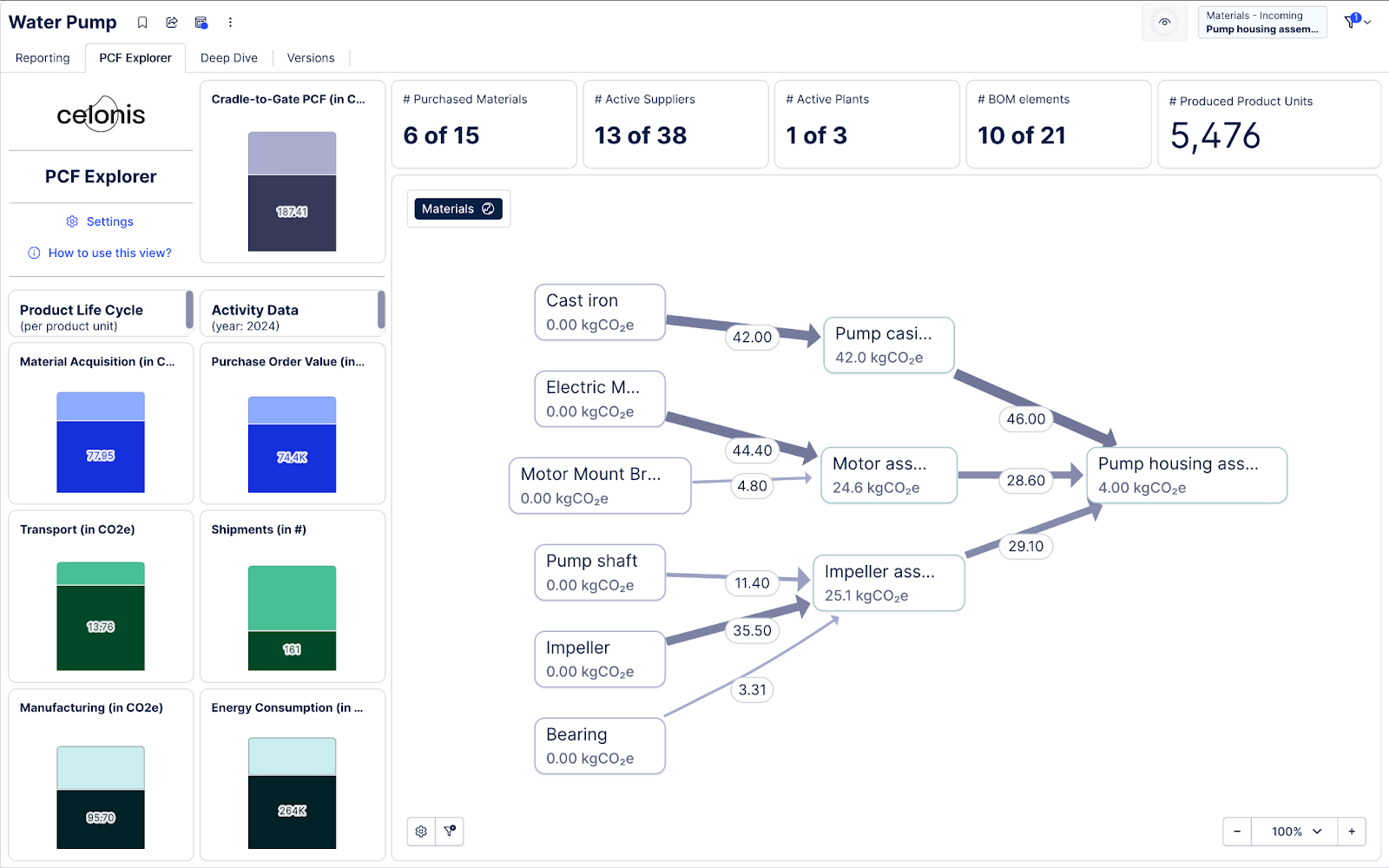
We’ve made major updates to Autopilot, hugely expanding its breadth and usability for mapping activities to emission factors. The latest version, preview-4, adds support for all reporting scopes, expanding its capabilities beyond procurement, and allows multilingual inputs.
This means you can now use Autopilot for any emission factor matching, cutting the time and investment needed to map activity data and deliver full scope reports.
preview4 limits its search to scope 3 emission factors by default; we’ve therefore added a new scopes filter to support scope-specific filtering. You can expand your search to all scopes by adding scopes: ["1", "2", "3"] in your request, or scopes: ["3.1", "3.2"] to filter by scope categories. We now also display the scopes field for emission factors returned by the /suggest endpoint as well.
Autopilot now also supports multilingual inputs, identifying the language of incoming queries to expand its usability and the accuracy of results.
The languages with full support are Bulgarian, Czech, Danish, Dutch, Estonian, Finnish, French, German, Hungarian, Irish, Italian, Latvian, Polish, Slovak, Spanish, Swedish, and Mandarin Chinese. Note that Autopilot still accepts inputs in other languages, but the model has not been optimized to support them and therefore match quality may be compromised.
Read more about Autopilot here →
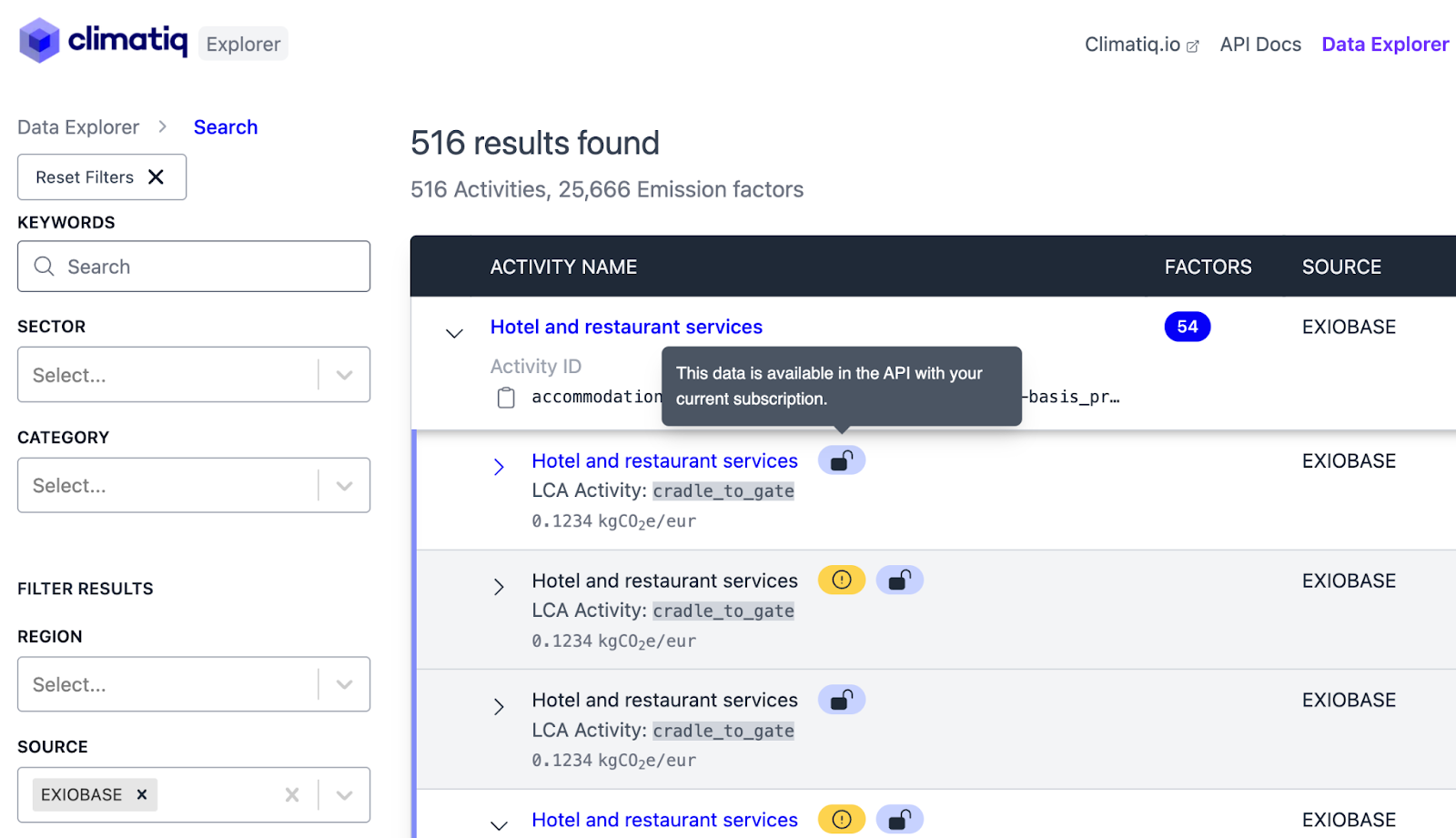
Climatiq users with an EXIOBASE subscription can now view emission factor values in Data Explorer—meaning it can act as your single source for emission factors.
If you have a subscription for this dataset, simply log in to Data Explorer and use the Source filter to start browsing factors (the ones in the screenshot below of course aren't the real values).
If you’re interested in purchasing the latest EXIOBASE data through Climatiq, you can reach out to our sales team for more info →
The Energy endpoint automatically calculates the greenhouse gas emissions associated with consumed energy based on relevant emission factors. The most recent version, v1.2, now incorporates the latest data version, data release 27. This expands coverage for new regions, including Singapore, updates existing data, and brings improvements to quality. See changelog here →
V1.1 is now deprecated, with a removal date set for November 2026.
Read more about the Energy endpoint →
Data release 27, including new additions:
For a full overview of data updates included in this release, please visit our data release notes.
Intermodal Freight v3 is the most up-to-date version of the freight endpoint, and is fully compliant with the latest version of the GLEC Framework (v3.1).
Freight v3 now falls back to Google Maps for geocoding locations if HereMaps fails to find the location, improving reliability. If you have journeys through countries such as China, Korea, Argentina, Colombia, and others where routing was previously challenging, the new version should have a significant impact on routing accuracy.
v2 and v3-preview1 have now been deprecated, the former after one year of support and the latter after three months. The only change from v3-preview1 to v3 is a fix to recognize transition point type overrides. If you use v3-preview1, you should therefore be able to simply change the URL you are using to use the latest version.
Intermodal Freight v1 has reached its end-of-life. Any remaining users must therefore move to a newer version; anyone still using v1 has the perfect chance to hop straight over to v3. The upgrade from older versions is explained in the changelogs →
Read more about the Intermodal Freight endpoint here →
Every emission factor in Climatiq now comes with scope information, making it easier than ever to find and use the right data that corresponds to the scope you need. Many factors are linked to multiple scopes, helping you understand exactly where and how they can be applied across your value chain.
You can now search for emission factors by scope directly through the Search API, whether you’re looking for scope 1, 2, or 3 data, including individual scope 3 categories such as 3.1. This makes it simpler than ever to align your calculations with the GHG Protocol and meet your reporting needs.
This is currently available via the Search endpoint, and will be available in Data Explorer soon.
Suggest and One-shot Estimate have two new optional filters to help you narrow down the results you receive in Autopilot preview4. This makes it easier to filter out paid datasets if you don't have a license, are looking for results from specific datasets, or only want to receive private emission factors in Autopilot. The new filters:
source_dataset allows you to select a list of datasets to include; source is the name of the dataset provider and dataset is the dataset and version provided by that source e.g. "source_dataset": ["EXIOBASE 3.10 - Industry"]access_type allows you to filter between dataset types (input can be public, premium, or private, where public includes openly available datasets, premium refers to paid datasets (ecoinvent, EXIOBASE 3.10, and IEA), and private is for emission factors you have uploaded yourself) e.g. "access_type": ["public"]Both of these filters accept a list of values.
Read more about Suggest and One-shot Estimate here →
Both Autopilot and Procurement now use industry-specific and country-specific inflation rates for 2023 and 2024.
As spend-based factors are usually published a few years after the time period they cover, it is best practice to adjust your expenditure amount for inflation to match the emission factor's year. With the addition of inflation data for 2023 and 2024, Autopilot and Procurement can now use the most recent data to automatically make inflation adjustments in spend-based calculations.
This means you may see your numbers shifting as estimates now use the most recent, and therefore accurate, inflation data.
Learn more about inflation adjustment →
We’ve released a new version of the Travel endpoint, Travel v1-preview3, which includes the latest 2025 flight and vehicle emission factors from BEIS.
Travel v1-preview3 also supports "Premium Economy" as an option for flight classes. This offers you extra customizability in your requests to more accurately reflect the type of journey taken.
Data version 26, including new additions:
For a full overview of data updates included in this release, please visit our data release notes.


.svg)


